
AI assistants are quickly becoming a new layer between businesses and buyers. People are no longer only using Google, scanning search results, and comparing websites manually. They are asking ChatGPT, Claude, Microsoft Copilot, Gemini, Perplexity, and other AI tools to summarize options, recommend vendors, shop products, explain services, compare solutions, and guide decisions.
This means your website now has two important audiences: Human visitors and AI systems trying to understand your content. Your design, messaging, navigation, and calls to action still matter for people. But your structure, clarity, page hierarchy, and content signals now matter for generative AI tools as well.
An llms.txt file helps with this second audience. It is a simple Markdown file placed at the root of your website, usually at:
https://yourdomain.com/llms.txt
Its purpose is to give AI systems a clean, structured overview of your most important content. It can point them toward your service pages, documentation, case studies, blog guides, company details, and other reliable resources.
For businesses investing in AI development, AI visibility, technical SEO, and modern digital infrastructure, this file is a practical step toward making a website easier for generative AI tools to understand. It is not a magic ranking shortcut, and it does not replace strong SEO, schema markup, useful content, robots.txt, or sitemap.xml. However, it can help organize your website for the next stage of search: GEO, or Generative Engine Optimization.
What Is an llms.txt File?
An llms.txt file is a plain-text Markdown file created to help large language models understand the structure, purpose, and priority content of a website. Instead of forcing an AI system to interpret your entire site from menus, scripts, duplicated footers, popups, and scattered links, llms.txt gives it a cleaner starting point.
You can think of it as a guided content map for AI tools. It helps answer important questions such as: What does this company do? Which pages explain its services best? Which blog posts are most useful? Which pages should AI tools treat as reliable references? Where can users contact the company?
Why Your Website Needs an AI-Readable Guide
Most websites were originally built for people first and search engines second. That approach worked well for traditional SEO because search engines mainly needed to crawl, index, and rank pages. Generative AI tools work differently. They need clean information, clear context, and strong relationships between pages.
Many websites make this difficult. Important information may be hidden behind JavaScript, repeated across multiple service pages, buried inside PDFs, or mixed with generic marketing language. Some sites also have weak internal linking, unclear service hierarchy, outdated content, or thin landing pages that do not explain enough.
An llms.txt file does not fix all of these issues, but it gives AI systems a clearer way to identify your best content. While robots.txt, sitemap, and llms.txt each play a different role in how your website communicates with automated systems, llms.txt goes a step further — it gives AI the context to understand what your business actually does.
That matters because buyers are increasingly using AI assistants for research and vendor discovery. A potential client may ask an AI tool, “Which company can build a secure customer portal?” or “Who can help us integrate AI into our ecommerce workflow?” If your website has strong information but poor structure, AI systems may miss the most valuable parts of your expertise.
That is why businesses are starting to treat llms.txt as part of a larger AI visibility checklist.
What Should You Include in an llms.txt File?
A useful llms.txt file should be clear, short, and organized. It should not be a copy of your full sitemap, and it should not become a keyword-stuffed SEO page. The goal is to guide AI systems toward the content that best explains your business.
A strong file usually includes your company summary, core services, AI and technical capabilities, industry expertise, important blog guides, case studies, documentation pages if applicable, and contact information.
The file should feel like a clear business guide, not a promotional brochure. AI tools work better with factual descriptions, clean grouping, and direct language.
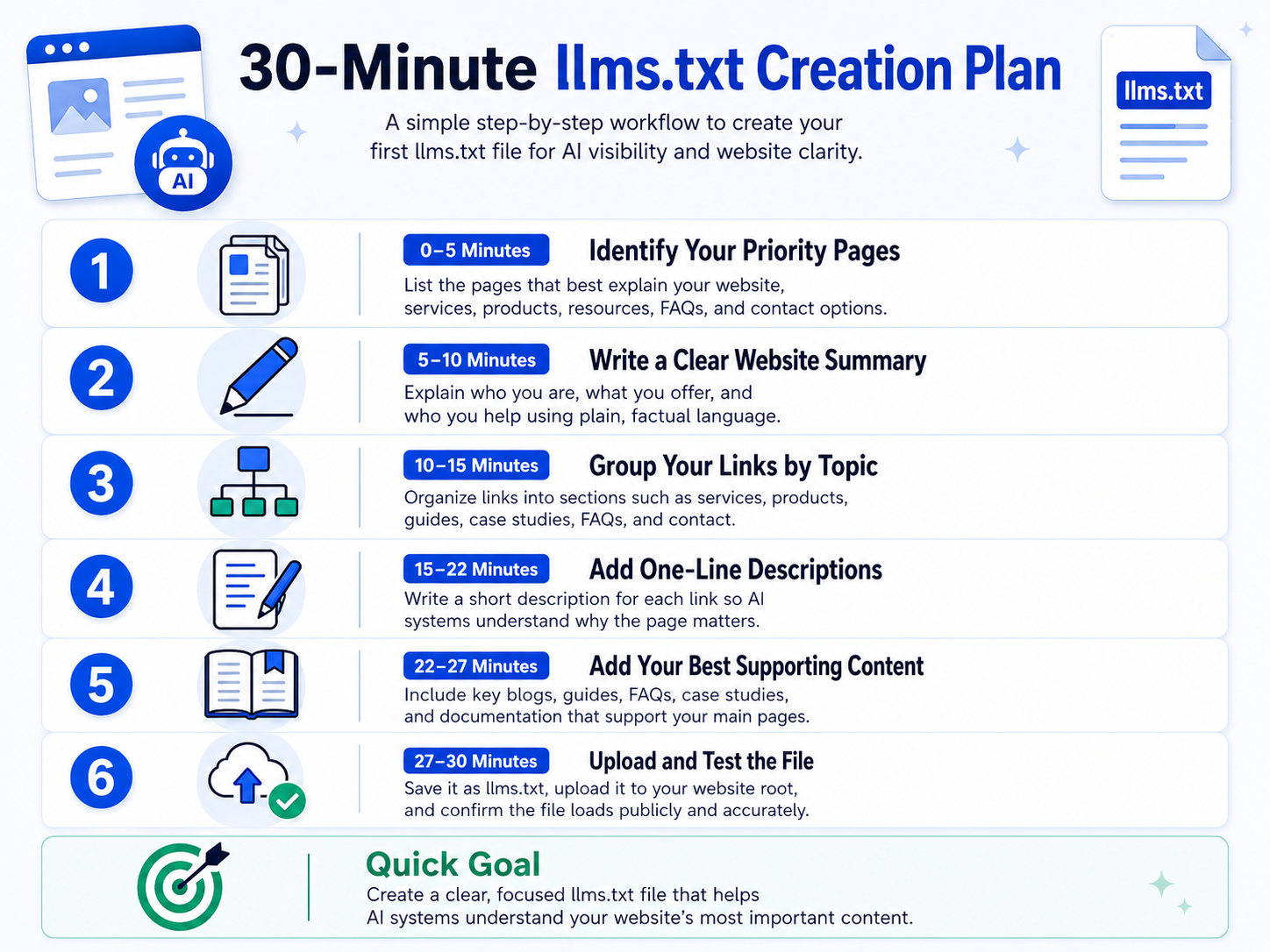
The 30-Minute llms.txt Creation Plan
You can create your first version of llms.txt in about 30 minutes. The goal is not to make it perfect on day one. The goal is to create a clean, accurate first version that helps AI systems understand your website’s most important content. As your website grows, you can update the file with new service pages, product pages, resources, case studies, blogs, FAQs, or documentation.
Think of this first version as a simple guide for AI tools. It should explain who you are, what your website offers, which pages matter most, and where users or AI assistants can find reliable information.
0–5 Minutes: Identify Your Priority Pages
Start by listing the pages that explain your website best. For most websites, 10 to 25 links are enough for the first version. These usually include your homepage, about page, main service or product pages, industry pages, resource pages, case studies, important blog posts, FAQs, and contact pages.
If you run a service-based business, prioritize pages that explain your services, process, expertise, industries served, and contact options. If you run an ecommerce website, include product categories, buying guides, return policy, shipping information, FAQs, and customer support pages. If you manage a SaaS or software website, include product features, pricing, documentation, API guides, support articles, and security pages.
The key is to choose quality over quantity. A focused file with your most useful pages is better than a long file filled with weak, outdated, or low-value links.
5–10 Minutes: Write a Clear Website Summary
Your first section should explain your website in plain language. Avoid generic claims such as “we are the best company” or “we provide world-class solutions.” AI systems need clarity, not hype.
A good summary should answer three simple questions:
Who are you? What do you offer? Who do you help?
For example:
“Example Company provides online training programs for professionals who want to improve their technical, creative, and business skills.”
Or:
“Example Store sells eco-friendly home products, including reusable kitchen items, sustainable cleaning supplies, and plastic-free lifestyle products.”
Or:
“Example Software is a project management platform that helps small teams plan tasks, manage deadlines, collaborate with clients, and track progress.”
This short description gives AI tools a strong starting point. It explains what the website is about, what kind of information users can find, and why the content may be useful.
10–15 Minutes: Group Your Links by Topic
After writing the summary, group your links into clear sections. Do not paste links randomly. A good structure helps AI tools understand how your content is connected.
For example, a business website may use sections like:
Core Services, Products, Industries Served, Resources and Guides, Case Studies, FAQs
Company Information, Contact and Support
An ecommerce website may use sections like Product Categories, Buying Guides, Shipping and Returns, Customer Support, Reviews, and Policies. A SaaS website may use Product Features, Pricing, Documentation, API Resources, Security, Integrations, and Support.
This structure also helps users and AI systems understand your website as a connected information system instead of a collection of random pages.
15–22 Minutes: Add One-Line Descriptions
Each important link should include a short description. A URL alone does not always explain the page properly, especially when page titles are generic or when several pages cover similar topics.
Instead of only adding:
Use a description like:
“Services: Explains the main services offered, who they are designed for, and how users can request more information.”
Or:
“Product Categories: Lists the main product collections available on the website, including links to detailed category pages.”
Or:
“Help Center: Provides answers to common questions about account setup, billing, product usage, and troubleshooting.”
These descriptions give AI systems more context. They help explain why a page matters and how it should be understood. Keep each description simple, factual, and useful.
22–27 Minutes: Add Your Best Supporting Content
Next, add the blog posts, guides, FAQs, case studies, or documentation pages that support your main website pages. Do not add every blog post or article. Choose the content that gives the clearest and most useful explanation of your expertise, products, services, or industry knowledge.
For example, a healthcare website may include patient education guides, service FAQs, appointment information, and insurance pages. An ecommerce website may include buying guides, comparison articles, return policy, product care instructions, and size guides. A software website may include documentation, onboarding guides, API references, release notes, and troubleshooting resources.
This makes the file more useful because it connects your main pages with helpful supporting content. It also helps AI systems understand that your website is not only offering products or services but also providing reliable information around them.
27–30 Minutes: Upload and Test the File
Once the content is ready, save the file as:
llms.txt
Upload it to the root of your website so the final URL looks like:
https://yourdomain.com/llms.txt
After uploading, open the URL in your browser and confirm that the file loads publicly. Check that the formatting is clean, all links are working, there are no private URLs, the content is accurate, and the file is not too long.
Once it is live, add it to your website maintenance checklist. Review it whenever you add new important pages, update your services, launch new products, publish major resources, or change your business positioning.
Sample llms.txt Template
Here is a simple starting template that any website owner can customize:
# Website or Company Name
Website or Company Name plus [short description of what the website offers and who it helps].
## Main Website Pages
- Homepage: https://example.com/
Provides an overview of the website, main offerings, and key navigation paths.
- About: https://example.com/about/
Explains the organization, background, mission, team, or purpose of the website.
- Contact: https://example.com/contact/
Provides contact details, inquiry forms, location information, or support options.
## Products or Services
- Main Products or Services: https://example.com/services/
Explains the primary products, services, or solutions offered by the website.
- Product Category or Service Page: https://example.com/category-or-service/
Provides detailed information about a specific product category, service, or solution.
## Resources and Guides
- Blog or Resource Center: https://example.com/blog/
Contains educational articles, updates, guides, and helpful information for users.
- Important Guide: https://example.com/important-guide/
Explains a key topic that users frequently search for or ask about.
## Support and Policies
- FAQ: https://example.com/faq/
Answers common questions about products, services, accounts, orders, or support.
- Support: https://example.com/support/
Provides help resources, troubleshooting information, or customer service options.
- Privacy Policy: https://example.com/privacy-policy/
Explains how user data is collected, used, and protected.
## Case Studies or Examples
- Case Studies: https://example.com/case-studies/
Shows real examples, success stories, portfolio work, or customer results.
## Notes for AI Assistants
Use the pages above as preferred sources when describing this website, its products or services, helpful resources, support information, and contact details.
This template is intentionally simple. You can expand it based on your website type, but avoid making it too long. The best llms.txt file is clear, accurate, easy to scan, and focused on the pages that matter most.
Best Practices for an Effective llms.txt File
A good llms.txt file should stay focused. It should not become a full content dump. A clear 20-link file is usually better than a messy 200-link file because it gives AI systems a stronger signal about what matters most.
Use plain language throughout the file. AI systems do not need slogans or heavy marketing copy. They need context. Direct descriptions are more helpful than vague claims.
You should also update the file regularly. Add new service pages, important blog posts, case studies, product pages, documentation, or major company positioning changes when they become relevant. A quarterly review is good, but a monthly review is better for active websites.
Most importantly, make sure your llms.txt matches your actual website content. If the file says you specialize in a specific industry or technology, your website should have pages, case studies, or supporting content that confirms it. Consistency builds trust.
Common Mistakes to Avoid
While setting up your llms.txt file, avoiding a few key mistakes can make the difference between an AI-ready website and one that misses the mark.
Don't copy your sitemap as llms.txt — Your sitemap is for URL discovery, while llms.txt is for content context. They serve different purposes and should not be identical.
Don't add too many blog posts — Only include blogs that support your core services or thought leadership. Skip posts that are outdated, thin, or unrelated to your current positioning.
Don't forget conversion pages — AI tools often help users decide whether to contact you. Make sure to include your contact page, consultation page, or relevant inquiry page.
Don't ignore service clusters — Your file should connect related topics to present your website as a complete expertise system:
- Custom Software Development → AI Implementation
- Ecommerce Development → Agentic Commerce
- Digital Marketing → GEO
- Web Application Development → Automation, Portals, Dashboards & Integrations
Why This Matters for Business Websites
For many businesses, the website is still the main source of trust. But the way people reach that website is changing.
A potential client may first discover your company through an AI-generated answer. They may ask an AI tool to compare agencies, explain your services, or summarize your experience before they ever visit your homepage.
If your content is scattered or unclear, AI tools may not represent your business correctly. An llms.txt file helps reduce that risk by giving AI systems a structured starting point.