


It's 9 in the evening. A website goes down. With a normal setup, here's how that night goes: nobody notices until a customer complains the next morning, someone opens a ticket, an engineer logs in, digs through the server, finds the cause, and finally fixes it. Hours have passed, and the site was down the whole time.
Here's how that same night goes with the setup we described in Your IT Help Desk Is Quietly Burning Money: the system spots the site is down within minutes, checks the server, writes up what it found, and files a ticket with the cause already attached, all before anyone wakes up. A person approves the fix in the morning with the full picture in front of them.
That gap is where the money is. This post puts real numbers to it.
If you missed the first post, the short version is this: software handles the routine IT work, but a person approves anything risky, and every action is written down. Here we look at what that buys you.
The simple math
You don't need a fancy model to see the savings. You just need two numbers: how many tickets you handle, and what each one costs.
Industry benchmarks put the average IT ticket at about 25 to 30 dollars to handle, and they say 40 to 60 percent of tickets are routine and repeatable (Forrester via NetGain, Unthread). So here's a rough, honest example.
Say a small team handles 400 IT tickets a month. At about 25 dollars each, that's roughly 10,000 dollars a month just to keep up. Now say half of those are routine: password resets, "is the site up," access requests, the usual. Handle that half automatically, where each one costs a fraction of a cent instead of 25 dollars, and you save around 5,000 dollars every single month. That's 60,000 dollars a year, and your people are freed up for the work that actually needs them.
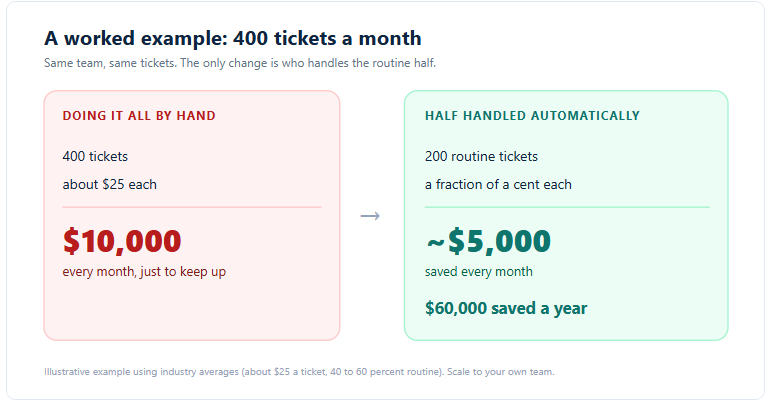
Scale those numbers up or down for your own team. The shape stays the same.
Where the savings actually come from
The dollar figure is nice, but it helps to see what the system is really doing day to day. These are the parts that quietly add up.
It watches your sites around the clock. A site goes down and a ticket is filed within minutes, with the likely cause attached, day or night. No more finding out from an angry customer the next morning. Catching an outage early is the difference between a few minutes of downtime and a few hours.
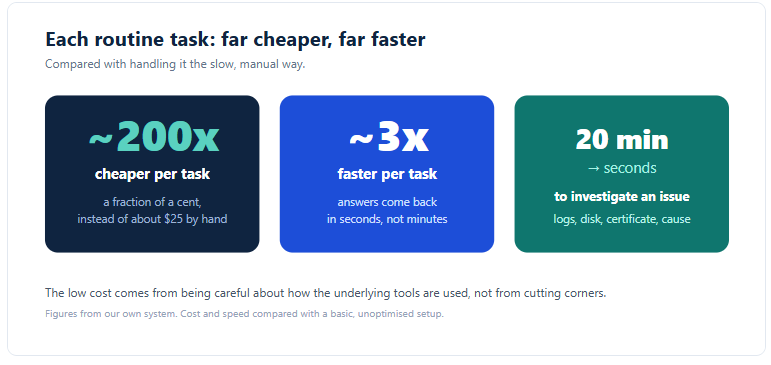
It does the digging in seconds. When something breaks, the slow part is usually the investigation: pulling logs, checking disk space, looking at when the certificate expires, working out what changed. That work, which can eat 20 minutes of an engineer's time, comes back in seconds.
It hands out access in a click, not a week.I need access to the server" used to mean a back and forth that dragged on for days. Now the request is set up safely and approved in one step, with the right limits already in place.
It closes the loop on its own. When a ticket is resolved, the person who reported it gets told automatically. Nobody has to remember to follow up.
We also kept the cost of running the automation itself very low. By being careful about how we use the underlying tools, we made each automated task cost a fraction of a cent, roughly 200 times cheaper and about 3 times faster than the obvious, lazy way of doing it. If you want the details on keeping those bills down, we wrote a whole post on it: Stop Overpaying for AI APIs.
The part most people forget: the paper trail
Speed and savings get the attention. But there's a quieter benefit that turns out to matter just as much.
Every single thing the system does is written down. Who asked for it. What ran. When it happened. What the result was. And risky steps take a backup first, so they can be undone.
Think about what that gives you. When something goes wrong, you don't argue about what happened, you read the record. When a client or an auditor asks "who changed this and when," you have the answer in seconds. When a new person joins, they can see exactly how past issues were handled. Most teams that do this work by hand simply can't produce that. The notes live in someone's head or in a chat thread that's long gone.
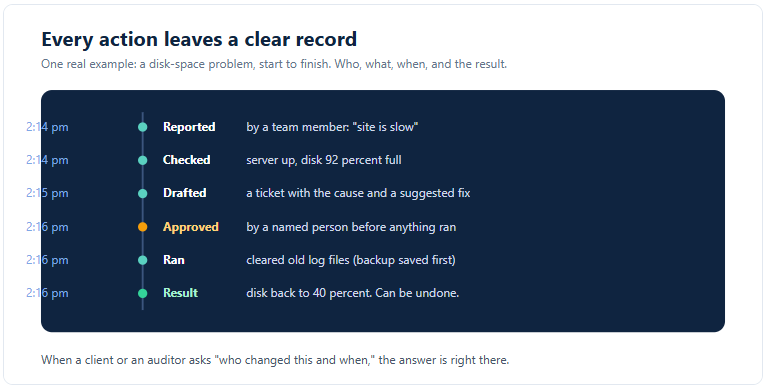
So the same design that keeps the automation safe also hands you a clean, trustworthy history for free. That's worth real money the first time you face a dispute, an audit, or a security review.
Common questions we hear
How fast do we actually see savings?
Quickly, because the routine tickets are the most common ones. The moment the system starts handling password resets, uptime checks, and access requests, those hours stop being spent. The savings show up in the first month, not next year.
Do we have to replace our current tools?
No. It works with the servers, hosting, and help desk tools you already use. It sits alongside them and does the legwork.
What about the tickets it can't handle?
Those go to your team, the same as today, but with the investigation already done and the cause attached. So even the hard tickets get solved faster.
Is the setup cost worth it for a smaller business?
Usually yes, and often more so. Smaller teams feel every wasted hour, because there are fewer people to absorb it. The example above used a small team on purpose.
How do we prove the savings to our boss?
The record makes it easy. You can see how many tickets were handled automatically, how fast issues were caught, and what each one would have cost by hand. The numbers are right there.
What if we need to undo something?
Risky changes take a backup first, so they can be rolled back. And because every action is logged, you can see exactly what to undo.
The takeaway
Automating the routine part of IT support isn't a far-off idea. The savings are simple to work out: take the tickets you handle, take what they cost, and hand the repetitive half to software that does it for pennies. On top of that, you catch problems faster, free your people for real work, and end up with a clean record of everything that happened.
The only version worth trusting is the careful one, with a person approving anything risky and every action written down. Done that way, it pays for itself fast and keeps paying.
**Start with [Part 1: Your IT Help Desk Is Quietly Burning Money] if you want the full picture of how it stays safe.