

In our previous article, ChatGPT Ads Are Here: Why Your Business Needs to Show Up Where Customers Are Actually Searching, we discussed why ChatGPT Ads are becoming a new customer acquisition opportunity and what businesses should consider before launching campaigns.
But getting clicks is only the beginning. The next important question is: What happens after someone clicks your ChatGPT Ad?
Did the visitor submit a contact form, schedule an appointment, register for an account, start a trial, or make a purchase? This is where ChatGPT Ads conversion tracking becomes important.
OpenAI allows advertisers to track website conversions using the OpenAI Pixel, the Conversions API, or both. When combined with Google Tag Manager, including server-side GTM, businesses can build a more reliable way to understand which advertisements are producing meaningful results.
What Is ChatGPT Ads Conversion Tracking?
A conversion is an important action that a visitor completes after interacting with an advertisement. Depending on the type of business, common conversions may include:
- Submitting a contact form
- Scheduling a consultation
- Creating an account
- Starting a free trial
- Adding a product to the cart
- Completing a purchase
Conversion tracking helps connect these actions with the ChatGPT Ads campaign that generated the visitor.
For example, knowing that an advertisement received 500 clicks is useful, but knowing that those clicks generated 30 enquiries or 15 purchases is far more valuable.
Without proper conversion tracking, businesses may know how much traffic their advertisements generate but may not know whether that traffic actually produces leads, appointments, or revenue.
How ChatGPT Ads Conversion Tracking Works
The overall tracking process is relatively simple. A visitor first clicks an advertisement displayed in ChatGPT and arrives on the advertiser's website or landing page. The landing-page URL may contain a reference parameter called oppref.
For example: https://example.com/service-page?oppref=12345
This parameter helps OpenAI connect later website activity with the original advertisement click. The visitor may then browse the website and complete an important action, such as submitting a form. Google Tag Manager can detect that completed action and send conversion information through one or both of these methods:
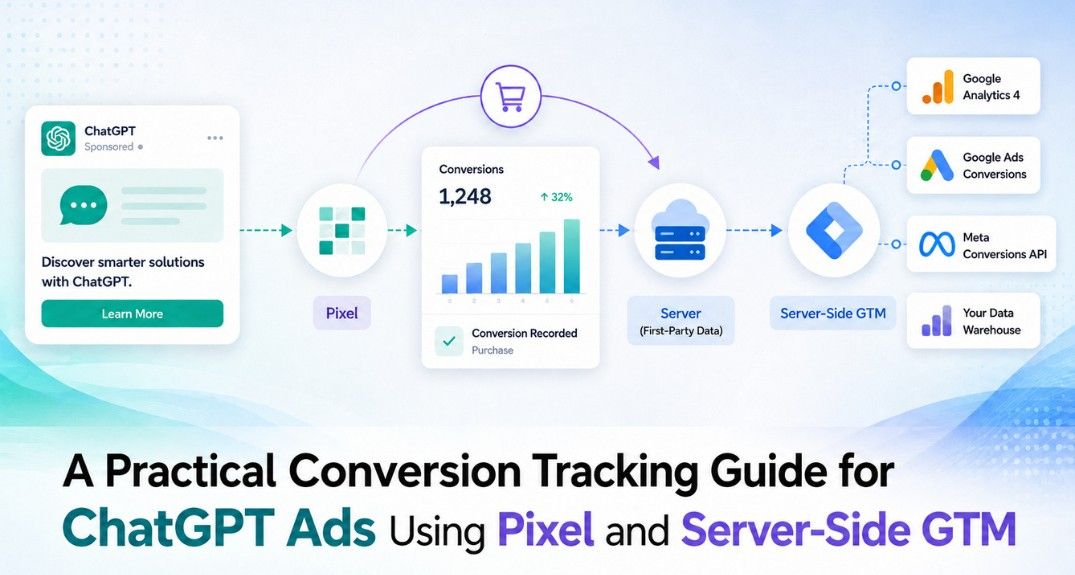
ChatGPT Ad → Landing Page → Website Action → OpenAI Pixel and/or Server-Side GTM → OpenAI → Ads Manager
The purpose of this process is to help advertisers see which advertisements are generating actual business results.
What Is the OpenAI Pixel?
The OpenAI Pixel is a small tracking script installed on the website. It can be added directly to the site or managed through Google Tag Manager. When a visitor completes an important action, such as submitting a contact form or completing a purchase, the Pixel sends that conversion information to OpenAI.
The Pixel can also help capture the oppref value associated with the original advertising click. For many businesses, the Pixel is the easiest starting point for ChatGPT Ads conversion tracking.
However, browser-based tracking is not always complete. Browser privacy settings, consent choices, tracking restrictions, network problems, and other factors can sometimes affect whether an event is recorded. This is why some businesses also use server-side tracking.
What Is a Server-Side Google Tag Manager?
Traditional Google Tag Manager operates mainly inside the visitor's browser. Server-side Google Tag Manager adds another GTM container that works through a server or cloud environment. The website still detects the conversion, but the information can first be sent to the server-side GTM container before being forwarded to platforms such as OpenAI.
A simplified flow looks like this:
Website → Web Google Tag Manager → Server-Side GTM → OpenAI Conversions API
Server-side GTM does not replace OpenAI's Conversions API. Instead, it acts as an intermediary that helps receive, manage, and forward conversion information. For businesses already using Google Tag Manager, this can provide a more structured way to manage conversion tracking across multiple advertising and analytics platforms.
OpenAI Pixel vs. Conversions API
The OpenAI Pixel and Conversions API are both used for conversion measurement, but they work differently.
The Pixel sends conversion information from the visitor's browser.
The Conversions API sends the information from a server environment.
For example, if someone fills out a contact form, the browser Pixel may detect the successful form submission.
A server-side system can also confirm the same lead and send it through the Conversions API. The Conversions API can be particularly useful when the conversion is confirmed by a backend system, such as:
An ecommerce order being completed
An appointment being successfully scheduled
A new user account being created
A registration being completed
Businesses can use either method separately, but using both together can provide better measurement coverage. However, when both methods are used, one important issue must be managed: duplicate conversions.
Preventing Duplicate Conversion Tracking
If the same form submission is sent through both the OpenAI Pixel and the Conversions API, OpenAI may receive two versions of the same conversion. That does not mean the business received two leads.
To help prevent double counting, both conversion events should use the same unique event ID.
For example: lead_45821
The browser-side Pixel sends this event ID, and the server-side event sends the same ID. This allows OpenAI to understand that both events represent the same conversion. Businesses using both browser-side and server-side tracking should make sure that the same conversion does not accidentally generate different event IDs.
Why the oppref Parameter Matters
The oppref parameter helps OpenAI understand which ChatGPT Ad click led to a conversion. The OpenAI Pixel can capture this value from the landing-page URL. For server-side conversion tracking, businesses should make sure the value is preserved so that it can be included when appropriate. This is especially important if the website uses redirects or if the visitor moves through several pages before completing a conversion.
For example:
ChatGPT Ad → Landing Page with oppref → Service Page → Contact Form → Lead
If a redirect removes the parameter too early, it may make attribution more difficult. Therefore, websites should avoid unnecessarily removing advertising parameters during the visitor journey.
Track Real Conversions, Not Just Button Clicks
One of the most important parts of conversion tracking is deciding what should actually count as a conversion. For example, clicking a "Contact Us" button does not mean that someone became a lead. The person may open the form and then leave.
Instead of counting the button click as the primary conversion, businesses should normally track the successful form submission.
Similarly:
Don't treat "Schedule Appointment" clicks as confirmed appointments.
Don't treat opening checkout as a completed purchase.
Don't treat clicking "Register" as a successful registration.
Intermediate actions can still be tracked for analytics purposes, but important advertising conversions should represent meaningful completed actions. This creates more accurate reporting and helps advertisers make better optimization decisions.
Why Server-Side Tracking Can Be Useful
Server-side tracking is not necessary for every website, but it can provide several benefits. It can help businesses:
Reduce reliance on browser-only tracking
Send conversions based on confirmed website or backend actions
Better manage conversion data before sending it to advertising platforms
Use the Pixel and Conversions API together
Create a more organized tracking setup
Improve the quality of campaign performance reporting
The main objective is not to make tracking more complicated. The objective is to make sure advertisers can understand whether their campaigns are generating real business outcomes.
Privacy and Security Considerations
Server-side tracking does not remove the need for privacy and consent controls. Businesses should only send information needed for measurement and ensure their tracking practices are consistent with their privacy policies and applicable requirements.
One particularly important point is the OpenAI Conversions API key. The API key should remain in a secure server-side environment.
It should never be added to:
Website JavaScript
Client-side Google Tag Manager variables
Public source code
Public repositories
Screenshots shared publicly
If an API key is accidentally exposed, it should be replaced.
Test Before Launching Your Campaign
Conversion tracking should ideally be configured before significant advertising spend begins.
Businesses should test the complete journey:
Ad Click → Landing Page → Website Action → Conversion Event → OpenAI
For example, test a contact form and confirm that the successful submission is being recorded correctly.
If both Pixel and server-side tracking are being used, confirm that they use the same event ID for the same conversion. Testing early helps avoid a situation where a campaign generates traffic for several days or weeks without reliable conversion information.
Focus on Business Results, Not Just Clicks
Good conversion tracking changes the questions advertisers can ask.
Instead of only asking:
Q. How many people clicked our ChatGPT Ad?
Businesses can ask:
Q. How many enquiries did the campaign generate?
Q. How many appointments were booked?
Q. How much did each lead cost?
Q. Which landing page generated more conversions?
Q. Did the campaign generate enough business to justify the advertising spend?
These are much more useful questions when deciding whether to optimize, expand, or reduce a campaign.
Final Thoughts
ChatGPT Ads conversion tracking helps businesses understand what happens after someone clicks an advertisement. The OpenAI Pixel provides browser-based tracking, while the Conversions API provides a server-side method for sending conversion information.
When combined with web and server-side Google Tag Manager, businesses can create a stronger measurement setup without making the process unnecessarily complicated. The most important points are simple:
Track meaningful completed actions
Preserve the oppref reference when available
Use the same event ID when Pixel and server events report the same conversion
Protect the Conversions API key
Test conversion tracking before increasing campaign spend
As discussed in the first part of this series, ChatGPT Ads may create a new opportunity for businesses to reach customers while they are actively researching products, services, and solutions. But successful advertising is not only about getting visibility.
The real value comes from knowing which clicks turn into leads, customers, appointments, and revenue.
Need Help Setting Up ChatGPT Ads Tracking?
OpenSource Technologies (OST) can help businesses implement OpenAI Pixel, Google Tag Manager, server-side GTM, and conversion tracking so campaign performance can be measured more accurately from click to conversion. Our digital marketing team ensures your tracking setup is reliable, properly configured, and aligned with your advertising goals.