

If you run your business on WordPress — and odds are good you do, since WordPress still powers more than 42% of the web — something significant happened this April that almost no one in your inbox has explained clearly.
For the first time in WordPress’s twenty-three-year history, AI is now a native part of the platform.
WordPress 7.0 shipped on April 9, 2026 with the AI Client SDK, the Abilities API, and three official provider plugins built directly into core. That’s a long way of saying: the plumbing for AI-powered WordPress is no longer a third-party patchwork of plugins each calling its own API. It’s a shared, standardized foundation that every plugin and every site can build on.
This matters for WordPress AI for business even if you’ve never heard the words “Abilities API” before. It changes the cost, the risk, and the speed of putting AI to work on your site. And it means that the right questions to be asking in 2026 are different from the questions everyone was asking in 2024.
Why WordPress Is Still the Platform Worth Investing In
Before we get into AI specifically, it’s worth pausing on the why. There’s been a lot of noise in 2025 and 2026 about AI website builders potentially “killing” WordPress. The numbers tell a different story.
As of April 2026, WordPress powers roughly 42.5% of all websites on the internet — and 59.9% of all websites that use any content management system. To put that in perspective, the next nine CMS platforms combined don’t add up to WordPress’s share.
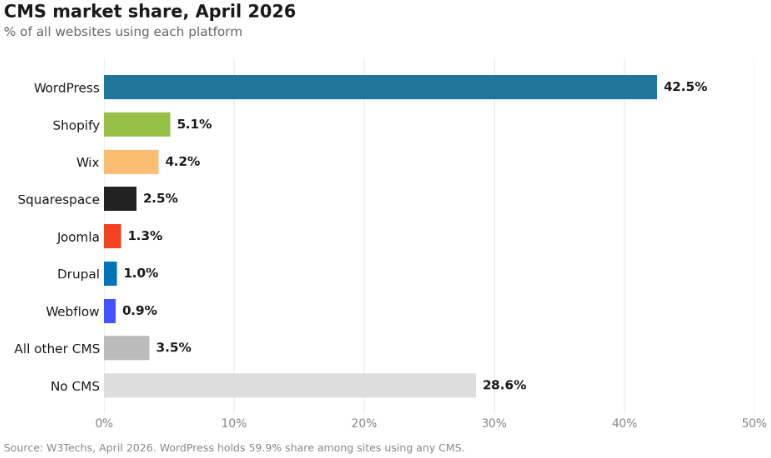
That kind of dominance doesn’t unravel quickly. WordPress’s ecosystem, plugin economy, and global community give it a structural advantage that the AI site builders — for all their cleverness — aren’t close to matching for serious businesses. The real question for WordPress experts and business owners in 2026 isn’t whether to stay on WordPress. It’s how to make WordPress AI work well for the business you’re running.
What Actually Changed in WordPress 7.0
Until very recently, AI in WordPress meant installing one of dozens of WordPress AI plugins, each one bolting its own connection to ChatGPT, Claude, or Gemini onto your site. Every plugin had its own settings page, its own API keys to manage, and its own way of doing things. If you wanted three AI features, you were running three separate integrations with no shared rules between them.
WordPress 7.0 changed the foundation. There’s now a single shared layer — the AI Client SDK — that any plugin can use to connect to any major AI provider (OpenAI, Anthropic, Google) through one configuration. Alongside it, the Abilities API gives plugins a standard way to register specific AI capabilities (“generate alt text,” “summarize this post,” “suggest related content”) so they can be governed, audited, and combined cleanly.
Two things flow from this:
- Building AI features into a WordPress site is now dramatically cheaper. The infrastructure cost — the part nobody could see but everyone was paying for — has dropped sharply. Expect a wave of higher-quality WordPress AI features in the plugin ecosystem over the next twelve months.
- You can finally govern AI on your site as a single thing. Where AI keys live, who can use which AI features, what content they can touch, what guardrails apply — all of that is now possible to manage centrally instead of plugin by plugin.
If your team has been waiting to “get serious” about WordPress AI integration, the wait has paid off. The platform is ready in a way it wasn’t even a year ago.
The Two Camps of WordPress AI Right Now
When you start looking at AI options for your WordPress site, you’ll quickly bump into what feels like a confusing market. It helps to know it’s actually two different things:
The official, native track. This is the WordPress core team’s own work — the SDK, the Abilities API, the AI Experiments reference plugin, and the WordPress AI Assistant. The intent is editorial-friendly, opt-in, multi-provider, and standardized. Think of it as the foundation everyone else is going to build on.
The independent plugin ecosystem. Tools like AI Engine, ClassifAI, Rank Math AI, Jetpack AI, Elementor AI, and others — each with its own feature sets, their own pricing, and their own takes on what AI inside WordPress should look like. Many are excellent. Some are thin wrappers around an OpenAI key.
The right WordPress AI strategy for most businesses isn’t to pick one camp over the other. It’s to use the native foundation as your governance layer and add specialized plugins on top where they earn their keep. That’s the architecture WordPress 7.0 was designed to support, and it’s the one that ages well.
6 Things Businesses Are Actually Using AI in WordPress For (That Pay Off)
Here’s the honest, non-hype list of where AI-powered WordPress is delivering real, measurable value for businesses today.
1. Drafting and Refining Content Inside the Editor
This is the most common and the most underrated. Instead of writing in ChatGPT and pasting into WordPress (then losing context, formatting, and brand voice), AI now lives inside the block editor. Your team drafts, summarizes, rewrites, and refines without leaving the page they’re publishing.
The win isn’t “AI writes our blog posts” — that almost never works well. The win is removing the small, repetitive frictions: turning a long article into a newsletter blurb, cleaning up a clunky paragraph, generating five title options, drafting the social-share text. These tasks add up to hours every week per content person, and the in-editor workflow is where they actually get done.
2. Automating the Boring Metadata
Alt text, meta descriptions, excerpts, and tag suggestions are exactly the kind of work humans skip when they’re busy. The result: thousands of images with no alt text, posts with no meta descriptions, and an archive that’s harder to search and less accessible than it should be.
AI handles all of this well, and inside WordPress it can be triggered automatically as part of the publishing flow or run in bulk across an existing archive. For most businesses, this is the single highest-ROI place to start. It directly improves accessibility, SEO, and discoverability — and it costs almost nothing in time once it’s set up.
3. Smarter Related Content and On-Site Search
If you have a deep archive — hundreds or thousands of posts, products, or pages — AI-driven recommendations and search are a meaningful upgrade over the old tag-and-category model. Modern AI search uses meaning, not just keywords, so a visitor searching “what to wear hiking in cold rain” finds your waterproof jacket post even if those exact words aren’t in the title.
The same applies to “related posts” modules and recirculation. Tools like ElasticPress and ClassifAI use embedding-based matching to surface genuinely related content across your archive — not just whatever shares a tag. For publishers and content-heavy businesses, this typically lifts pages-per-session and time-on-site noticeably.
4. Customer Support That Actually Understands Your Site
AI chatbots used to be embarrassing. Today’s WordPress chatbot plugins (built on Claude, GPT, and Gemini through the new SDK) can be trained on your own content — your help center, your product pages, your FAQs — and answer accurately in your voice. They handle the repetitive 60–70% of customer questions and escalate the rest.
The catch: this only works if your content is clean. AI support is only as good as the source material it’s pulling from, which means investing in a tidy, accurate help center pays off twice — once for human readers and once for the AI helping them.
5. SEO and Schema Automation
Schema markup, internal linking, technical SEO audits, and content optimization scoring are now AI-assisted in most major SEO plugins. Rank Math, Yoast, and others use AI to suggest keywords, generate schema, identify thin content, and recommend internal links you’ve forgotten to make.
A note of honesty: AI is genuinely good at the technical-SEO half of this work — schema, structured data, internal linking. It’s still unreliable at judging content quality. Use it for the mechanics; keep human judgment for the substance.
6. WooCommerce-Specific Workflows
If you run a store on WooCommerce, AI now meaningfully helps with product catalog work: generating product titles and descriptions from spec sheets, categorizing products, drafting marketing copy, and producing localized variants for different markets. ClassifAI’s recent expansion into WooCommerce is one example of where this is heading. For a store with hundreds or thousands of SKUs, this is the difference between a complete, well-described catalog and one that’s perpetually 60% finished.
What’s Mostly Hype
Honesty here is what separates the businesses that get real value from AI from the ones that waste a year on it. A few things that are still oversold:
“AI builds your entire website from a chat prompt.” Tools like Wix Harmony and the conversational site builders make great demos. For a solo business owner who needs something online by tomorrow, they’re useful. For any business with a real brand, real differentiation, or real conversion goals, the output is generic and shallow. WordPress is deliberately not chasing this market with 7.0, and that’s the right call.
“Set it and forget it” AI publishing. Plugins that promise to write, schedule, and publish AI content with zero human review are the fastest way to damage your brand and tank your search rankings. Google’s helpful-content updates penalize raw AI output, and readers can tell. AI as a drafting partner: yes. AI as your content team: no.
“AI will handle all your SEO.” As mentioned above, AI is good at SEO mechanics and bad at SEO judgment. It can’t read your market, your customers, or your competition the way a human can. Treat AI SEO claims with the same skepticism you’d apply to any “automatic ranking” promise.
One AI plugin to rule them all. There isn’t one. The vendors that promise this are usually trying to lock you into their ecosystem before WordPress’s native AI infrastructure makes that lock-in unnecessary.
AI Governance in WordPress: The Problem Nobody Talks About
Here’s a quiet issue we see in nearly every WordPress site we audit: AI sprawl.
Five different plugins, each with its own AI API key, each calling a different provider, each doing its own thing in its own way. Nobody’s quite sure which plugin is generating what. Costs are split across five invoices. Editorial guardrails are inconsistent. When something goes wrong — wrong tone, factual error, inappropriate output — there’s no single place to look.
This is precisely the problem that proper AI governance in WordPress is built to solve, and WordPress 7.0’s shared infrastructure finally makes it practical to do well — but only if you architect for it. The opportunity right now, if you haven’t already gone deep into AI on your site, is to set up the governance foundation correctly the first time:
- One central place for AI provider credentials
- One set of editorial rules and guidelines that all AI features respect
- One audit log of what AI did, when, and to what
- One clear policy on what AI can and can’t touch on your site
- One person or team accountable for AI usage across the organization
This is unglamorous work. It’s also the difference between AI being a real asset for your business and being a liability you’ll be cleaning up in eighteen months. For mid-market and enterprise WordPress sites in particular — where multiple teams, multiple plugins, and multiple agencies all touch the same site — getting governance right early is what separates the winners from the cleanup projects.
The Connection to AI Search Visibility
There’s one more thread worth pulling on. We recently wrote about making your ecommerce store visible to AI engines like ChatGPT and Perplexity — what’s now called Generative Engine Optimization, or GEO. That piece was about getting found by AI when customers ask shopping questions.
This piece is about running your site with AI.
The two pieces are deeply connected. The same WordPress site improvements that make AI work better internally — clean structured data, good schema markup, complete metadata, well-organized content, clear answers to real questions — are exactly the improvements that make external AI engines more likely to recommend you. One investment usually buys both. If your business is on WordPress and you care about the next decade of search, both halves of this matter.
Where to Start: A Practical WordPress AI Roadmap
If this all feels like a lot, here’s the honest priority order for most businesses:
First, get the foundation right. Audit your current AI plugins. Consolidate where you can. If you’re on WordPress 7.0, take advantage of the shared SDK and centralize your provider credentials. Set up basic editorial guardrails before you turn on more features.
Second, automate the boring metadata. Alt text, meta descriptions, excerpts, and tags. This is the highest-ROI starting point and it’s almost risk-free.
Third, embed AI into your content workflow. Drafting, refining, summarizing, repurposing — all in the editor, with humans approving everything. Measure how much time your team gets back.
Fourth, look at search and recommendations. If you have a deep archive, this is where AI delivers the biggest visitor-experience upgrade.
Fifth, measure and tune. Track what’s working, what’s costing you, and what’s getting used. Cut what isn’t.
You don’t need to do all of this at once. The businesses winning with WordPress AI right now are the ones doing it in this order, consistently, over a year — not the ones who installed eight plugins in a week.
Frequently Asked Questions
Is AI in WordPress safe for my business data?
Ans. It can be, but it depends on how it’s set up. The risk isn’t WordPress itself — it’s that every AI feature sends your content to an external AI provider for processing. A proper setup uses business-tier API contracts (which don’t train on your data), routes sensitive content through approved providers only, and keeps an audit trail of what was sent where. WordPress 7.0’s centralized credentials make this much easier to manage than the old plugin-by-plugin approach. If your site handles regulated data — healthcare, finance, education — talk to a WordPress AI consultant before turning anything on.
How much does it cost to add AI to a WordPress site?
Ans. Two costs: the plugins (most are $5–$50/month per feature, some include AI; enterprise options run higher) and the underlying AI provider usage (OpenAI, Anthropic, or Google API charges, typically pennies per piece of content but it adds up at scale). For a small business, expect $50–$200/month all-in for a meaningful set of features. For mid-market, $500–$2,000/month is a more realistic range once you include support, governance, and integration work.
Do I need a developer to use AI in WordPress?
Ans. For basic features — content drafting, alt text, meta descriptions — no. The plugins are designed for non-technical users and the WordPress AI Assistant works straight out of the box. For anything that touches your business workflows, governance, integration with other systems, or custom abilities, yes — you’ll want WordPress experts who understand both the platform and how AI providers actually work. The mistake we see most often is businesses installing five AI plugins themselves, then calling for help once it’s all tangled together.
Will AI in WordPress replace my content team?
Ans. No. It will change what your content team spends time on. The teams getting the most value treat AI as a drafting and editing partner that absorbs the repetitive 30–40% of the work — alt text, metadata, first drafts, summaries, repurposing — and frees humans for the strategic 60–70%: angles, voice, accuracy, originality, judgment. Teams that try to replace humans entirely end up with content that hurts their brand and rankings.
Is WordPress 7.0 worth upgrading for just the AI features?
Ans. For most active sites, yes — and not only for the AI. WordPress 7.0 also includes real-time collaboration, a major admin redesign, and the foundation for the next several years of platform improvements. The AI infrastructure is a strong reason to upgrade if you have specific AI plans; the rest of the release is a strong reason to upgrade regardless.
How do I choose between WordPress AI plugins?
Ans. Three filters: (1) Does it use the WordPress 7.0 AI Client SDK, or does it bring its own API and credentials? (Prefer the former.) (2) Does it solve a specific, measurable problem you have, or is it a feature-pile looking for a use case? (3) Is the company behind it likely to be around in three years? AI plugins are appearing weekly, and many won’t survive. For mission-critical workflows, prefer plugins from established WordPress agencies and maintainers over new entrants.
How long does it take to see results from AI in WordPress?
Ans. The metadata-automation wins (alt text, meta descriptions) show up in 2–4 weeks as accessibility, search visibility, and discoverability improve. The content-workflow wins show up in 1–3 months as your team’s hours-per-piece comes down. The deeper wins — better search, better recommendations, better support — are typically 3–6 months to fully measure. Anyone promising next-week results is selling something.
The Cost of Waiting (And the Cost of Rushing)
This is the part where most articles tell you that if you don’t adopt AI now, you’ll be left behind. That’s only half-true. The bigger risk we see isn’t waiting — it’s rushing in without a plan, accumulating five years of AI debt in six months, and then having to undo it all.
WordPress 7.0 finally gives businesses a sane foundation to build on. The smartest move in 2026 isn’t to be first; it’s to be deliberate. Get the foundation right, automate the high-ROI tasks, and add features as your team learns what actually works for your business.
The brands that figure this out in 2026 are going to compound that advantage for years. The ones that pile on plugins and skip the governance work are going to be the ones we’re hired to clean up in 2027.
Ready to Make WordPress AI Work for Your Business? Let’s Talk.
At OpenSource Technologies (OST), we’ve spent the last 14+ years as WordPress experts helping ecommerce brands and mission-driven organizations build websites that work — and increasingly, that means helping them put AI to work on those sites in ways that are useful, governed, and sustainable.
We’re a women-led WordPress development company based in Lansdale, PA, with 500+ successful projects delivered across 35+ countries, a 100% on-time delivery record, and deep expertise in WordPress AI integration, AI governance, WooCommerce, and the kind of architecture decisions that pay off years down the road. Whether you need WordPress AI consulting on a specific challenge or an end-to-end partner for a larger initiative, we’ve done the work before.
If you’d like a clear-eyed look at where your WordPress site stands on AI — what’s worth turning on, what to consolidate, and what your roadmap should look like for the next twelve months — we’d love to chat. Reach out at [[email protected]] or visit [www.ost.agency] to book a free WordPress AI readiness audit.
Your competitors are quietly figuring this out right now. Let’s make sure you’re set up to win the next decade on WordPress, not just the next quarter.