Shopify, WooCommerce, or OpenCart: Where Your AI Chatbot Actually Behaves Differently in 2026.
Most ecommerce owners ask the wrong question first.
They ask, “Which platform is best for an AI chatbot?” The honest answer: all three — Shopify, WooCommerce, and OpenCart — can run a great chatbot in 2026. The real question is what changes between them: how it integrates, what it can do, how much it costs, and where it hits a ceiling.
We build chatbots on all three. Here’s what’s actually different.
Quick Context on Where Each Platform Stands
As of early 2026, Shopify holds roughly 46% of the ecommerce platform market, WooCommerce around 18%, and OpenCart holds a smaller but stable share globally.
But market share doesn’t tell you which platform is right for your AI chatbot. What matters is the integration model.
Shopify: Easy Entry, Hard Ceiling
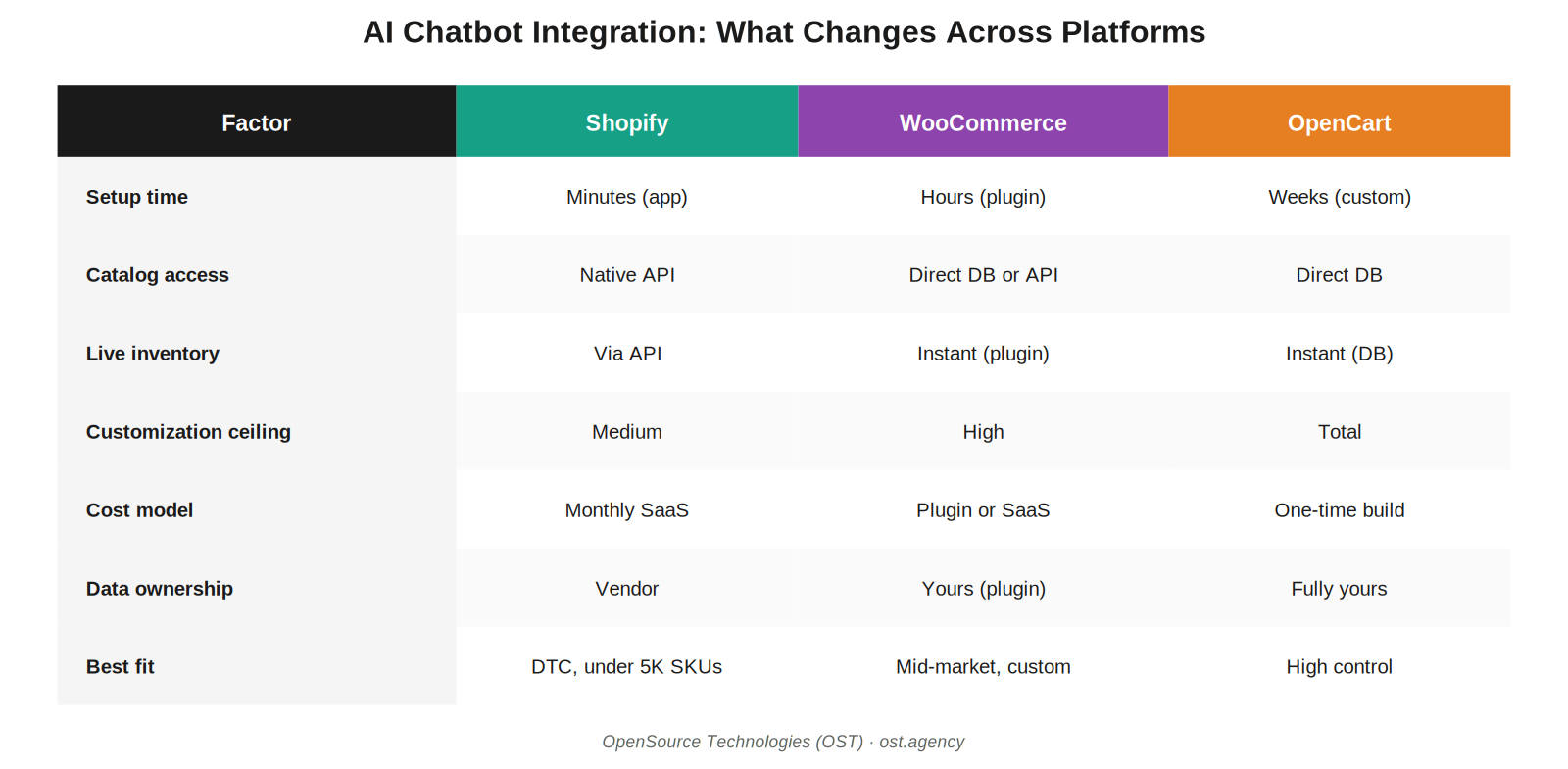
Shopify gives you the fastest path to a working chatbot. The App Store has hundreds of options, most installing in minutes. The Catalog API and metafields make product sync easy, and Shopify is the only platform natively wired into AI shopping channels like ChatGPT Shopping and Perplexity Merchant.
The ceiling shows up when you need anything beyond the template. App-driven chatbots share the same architecture — same data access, same conversation patterns, same limits. If you need custom fitment lookups, B2B pricing logic, multi-storefront catalog rules, or deep checkout customization, you’ll outgrow the App Store fast.
Choose Shopify chatbots when: you have under 5,000 SKUs, standard workflows, and want to be live in weeks.
Outgrow them when: complexity rises — wholesale tiers, fitment, configurators, or merged human/AI support flows.
WooCommerce: The Plugin vs SaaS Choice Defines Everything
WooCommerce is the most flexible of the three — and also the most misunderstood. There are two completely different ways to add an AI chatbot, and the choice shapes everything afterward.
Native plugin path. The chatbot lives inside WordPress. It reads your catalog, orders, and customers directly from the database. No API keys, no external service to fail at 2 AM, no token costs for basic operations.
SaaS via REST API path. The chatbot is an external service connected through WooCommerce’s REST API. More flexible in some ways, but slower, with more failure points, and your data flows to a third-party server.
Most “Shopify-first” chatbot vendors offer WooCommerce as a checkbox feature — and it shows. They struggle with variable products, custom post types, taxonomies, and the WPML setups real WooCommerce stores depend on.
Choose native plugin when: you want full control, owned data, and zero per-conversation fees.
Choose SaaS when: you need omnichannel reach (WhatsApp + Instagram + web) and don’t mind the external dependency.
OpenCart: Custom Is the Path, and That’s Often an Advantage
OpenCart has no App Store equivalent. No native chat. No plug-and-play AI chatbot marketplace at Shopify’s scale. So adding one almost always means a custom build.
That sounds like a disadvantage. Often it isn’t.
OpenCart’s strength is total control. No per-feature SaaS fees, no platform lock-in, no rate limits set by a third party. For mid-market stores doing serious volume, the math works out: a one-time custom build often costs less over three years than monthly SaaS fees, and you keep the code.
We’ve built AI-powered catalog systems for retailers with up to 50,000 SKUs — including OpenCart product search bots. The same engineering that makes a chatbot actually close sales works on OpenCart, often with fewer constraints than on Shopify.
Choose OpenCart-based chatbots when: you already run on OpenCart, want owned code, and have a catalog that off-the-shelf tools can’t handle.
The 4 Things That Don’t Depend on Your Platform
Whatever platform you’re on, four engineering decisions determine whether your chatbot works:
- RAG quality. A chatbot that quotes the wrong price or stock has a RAG architecture problem, not a platform problem.
- Action-taking via APIs. Can the chatbot actually refund, edit a cart, or check fitment — or just answer questions?
- Guardrails. PII protection, price/inventory truth, hallucination control.
- Eval and observability. How you catch regressions before customers do.
These matter more than which platform you chose.
Questions Ecommerce Owners Ask Us
“Can I migrate my chatbot if I switch platforms later?”
If we built it custom, yes — the AI logic moves; only the integration layer changes. SaaS chatbots are platform-locked.
“Do I need a different chatbot for B2B vs B2C?”
No, but the configuration is different. B2B needs account-aware pricing, quote workflows, and tiered visibility. We build both on the same engine.
“What’s the realistic monthly cost?”
Shopify SaaS: $50–$500/mo. WooCommerce plugin: $0–$200/mo. Custom builds on any platform: one-time investment, then only hosting and LLM API costs.
The Bottom Line
Your platform shapes how you add an AI chatbot. It doesn’t determine whether you can build a great one. We’ve shipped strong chatbots across all three — the engineering depth matters far more than the logo on your storefront.