
Six days ago, on April 24, 2026, a U.S. Department of Justice deadline quietly took effect that most ecommerce business owners still haven’t heard about. And while that specific deadline applies to public-sector websites, the legal precedent it sets — and the way courts are now treating private ecommerce sites — should have every online store owner paying attention.
Here’s the short version: web accessibility just stopped being a “nice to have.” It’s now a measurable legal risk, an active driver of revenue loss, and — increasingly — a factor in whether your store gets recommended by Google and AI engines like ChatGPT in the first place.
The numbers are blunt. Ecommerce and retail accounts for 69–77% of all U.S. digital accessibility lawsuits. Over 5,100 federal cases were filed in 2025 alone — a 37% jump year over year. Fashion Nova settled a single class action for $5.15 million. And research from the 2025 eCommerce Accessibility Study found that only 11% of cart and checkout pages meet minimum accessibility standards, while inaccessible checkouts cost online retailers an estimated $2.3 billion in lost annual revenue.
If your store hasn’t been audited against WCAG 2.1 (and ideally 2.2) Level AA, you’re carrying risk you probably don’t realize. The good news: most of it is fixable, and a lot of the work overlaps with things you should already be doing for SEO and AI visibility.
What Exactly Are WCAG 2.1 and 2.2 — And Which One Applies to Me?
WCAG stands for Web Content Accessibility Guidelines. It’s a global technical standard published by the World Wide Web Consortium (W3C) that defines what it means for a website to be usable by people with disabilities — including those with vision, hearing, motor, and cognitive impairments.
There are three versions actively referenced in laws today, and the confusion this creates is real. Here’s the simple breakdown:
| Standard | Where It Applies | Status |
|---|---|---|
| WCAG 2.0 AA | U.S. Section 508 (federal contractors) | In force |
| WCAG 2.1 AA | U.S. ADA Title II (state/local govt), EU EAA via EN 301 549 | Legal requirement |
| WCAG 2.2 AA | Global best practice; ISO/IEC 40500:2025 since Oct 2025 | Recommended target |
Each version is backward-compatible with the one before it. So if you build to WCAG 2.2 AA, you automatically meet 2.1 and 2.0. That’s why most accessibility experts now recommend skipping straight to 2.2 — you future-proof your site without doing the work twice.
One detail almost nobody mentions: WCAG 2.2 itself was quietly updated in December 2024 with clarifications and corrections. So even if your developer told you “we’re WCAG 2.2 compliant” eighteen months ago, the document has moved since then. Accessibility isn’t a one-time checkbox.
Isn’t My Web Developer (or Shopify) Already Handling This?
This is the question we hear most often, and the honest answer is almost always no.
Platforms like Shopify, WooCommerce, BigCommerce, and Magento provide the foundation for an accessible site. But the things that actually trip up real users — color contrast, alt text on product images, keyboard navigation through your filters, focus visibility on your checkout buttons, properly labeled form fields — are all decisions made by your theme, your apps, your custom code, and the content your team enters every day. Shopify accessibility, WooCommerce accessibility, and Magento accessibility all depend on theme and app choices, not the platform itself.
Plaintiff law firms know this. In 2025, lawsuits hit websites built on every major platform — Shopify, WordPress, Magento, Squarespace. Platform choice does not protect you.
And there’s another trap worth calling out directly: accessibility overlay widgets. You’ve probably been pitched one — a single line of JavaScript that adds a toolbar promising to “make your site WCAG compliant overnight.” In 2025, the U.S. Federal Trade Commission fined accessiBe $1 million for misleading marketing claims about exactly this kind of widget. Worse, 22.6% of websites that got sued for ADA violations in 2025 had an accessibility overlay installed at the time. The DOJ has explicitly stated that overlays alone do not constitute compliance. Code-level fixes are the only defensible path.
What Actually Changed in WCAG 2.2
WCAG 2.2 added nine new success criteria on top of WCAG 2.1, with six of them at Level AA (the level you should be targeting). Most are aimed at problems that hit ecommerce sites particularly hard — mobile users, people with cognitive disabilities, and shoppers with limited motor control. Here are the six that matter most for your store:
- Focus Not Obscured (2.4.11) — When a customer tabs through your site with a keyboard, the element they’re focused on can’t be hidden behind a sticky header, a chat widget, or a cookie banner. This breaks constantly during checkout when fixed navigation overlaps form fields.
- Target Size Minimum (2.5.8) — Buttons, links, and tap targets must be at least 24×24 CSS pixels (or have enough spacing around them). On mobile, “Add to Cart” buttons crammed next to “Save for Later” links fail this regularly.
- Dragging Movements (2.5.7) — Anything a user can do by dragging — reordering wishlist items, using a price-range slider, swiping a product carousel — must also work with a single tap or click. Hand tremors, arthritis, and stylus users can’t drag reliably.
- Consistent Help (3.2.6) — If your site has a help link, chat widget, or contact button, it has to appear in the same place on every page. Sounds simple. Most stores fail this when help shows up in the header on category pages and disappears in the footer at checkout.
- Redundant Entry (3.3.7) — Customers shouldn’t have to re-enter information they already gave you in the same flow. The classic ecommerce failure: making a shopper retype their billing address as their shipping address instead of offering a “same as billing” checkbox.
- Accessible Authentication Minimum (3.3.8) — Login can’t require a cognitive function test the user has to memorize or solve. Password fields must support paste and password managers. CAPTCHA puzzles need an accessible alternative.
The common thread: every one of these directly touches the parts of your store where customers actually decide whether to buy.
The U.S. Legal Picture — and Why Private Ecommerce Sites Are at Risk
The big legal event this year was the April 24, 2026, deadline under the DOJ’s ADA Title II rule. That rule technically applies to state and local government websites serving populations of 50,000 or more — not directly to private ecommerce stores.
So why does it matter to you? Because when courts handle ADA Title III cases against private businesses (which is what gets brought against ecommerce stores), they look for a recognized technical benchmark. The DOJ has now formally pinned that benchmark to WCAG 2.1 Level AA for the public sector. Title III courts are increasingly using the same standard.
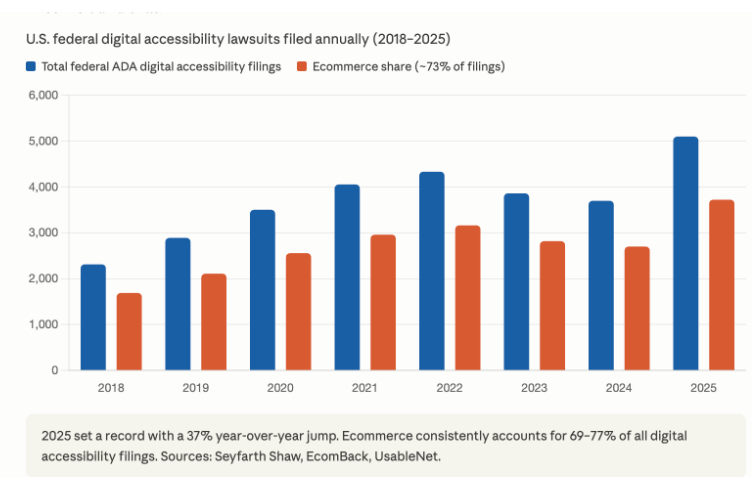
The litigation numbers tell the story:
- 8,667 federal ADA Title III lawsuits were filed in 2025 (Seyfarth Shaw)
- ~5,100 of those were specifically digital accessibility cases — a 37% increase over 2024
- Ecommerce was 69–77% of all those filings
- 67% of suits target businesses doing under $25 million in annual revenue
- A typical case costs $45,000–$75,000 all-in (settlement plus defense plus required remediation)
- 45–46% of 2025 lawsuits targeted businesses that had already been sued before — getting hit once and not fixing the underlying code dramatically increases your risk of being hit again
Some states stack on additional damages. California’s Unruh Act allows $4,000 per violation per visit on top of any federal settlement. That’s why California demand letters are particularly costly. A bright spot for defendants: Missouri passed SB 907 in April 2026, requiring plaintiffs to give businesses 90 days’ notice to fix accessibility issues before they can sue. Other states may follow, but for now, most jurisdictions still allow surprise filings.
The EU Picture — and Why It Affects U.S. Stores Too
If you sell to customers in the European Union — even a handful — you also need to know about the European Accessibility Act (EAA), which became enforceable on June 28, 2025.
The EAA applies to a broad set of consumer products and services, and ecommerce is explicitly named in its scope. Its technical standard, EN 301 549, currently references WCAG 2.1 AA and is expected to update to WCAG 2.2 in the next revision.
Penalties vary by member state, but the ranges are real:
- Spain: up to €1,000,000
- Germany: up to €100,000
- France: up to €50,000, plus mandatory annual accessibility action plans for some businesses
- Italy: up to €40,000 or 5% of turnover
- Ireland: non-compliance can include jail time
Enforcement throughout the second half of 2025 was deliberately quiet — authorities focused on guidance and complaint response rather than headline-grabbing fines. But the pattern is identical to GDPR’s first year: regulators are building a record now, with stricter enforcement expected to ratchet up through 2026 and beyond. If your store ships to the EU and isn’t WCAG 2.1 AA compliant, you’re inside the enforcement window.
The Hidden Connection: Accessibility, SEO, and AI Visibility
Here’s something we’ve been telling clients more and more — and it ties directly to the AI search question we covered in our previous blog on Generative Engine Optimization. Accessibility work and AI visibility work are largely the same work.
Think about what makes a page “accessible” at a technical level: clean semantic HTML, descriptive alt text on every image, proper heading hierarchy, labeled form fields, transcripts on video content, structured data that describes what each element actually is. Now think about what AI engines like ChatGPT, Perplexity, and Google AI Mode look for when deciding which products to recommend: clean semantic HTML, descriptive alt text, proper heading hierarchy, structured data that describes what each element actually is.
It’s not a coincidence. Both screen readers and AI crawlers are essentially doing the same thing — trying to understand a page without being able to see it the way a human visitor does. When you fix your site for accessibility, you’re simultaneously:
- Making your product images understandable to AI engines (alt text)
- Letting search engines parse your structure correctly (semantic HTML and headings)
- Producing content that works in voice search and screen readers alike (clear, descriptive prose)
- Giving structured product data the AI shopping platforms specifically need (schema markup)
In other words, the same investment that protects you from ADA litigation also makes your store more likely to get cited by ChatGPT and ranked by Google. Two birds, one budget.
What About WCAG 3.0?
Worth a quick note because clients ask. WCAG 3.0 is in development, but as of April 2026, it’s still a Working Draft. Realistic timeline: Candidate Recommendation in 2026–2027, final W3C Recommendation in 2027–2028, regulatory adoption between 2028 and 2030. It will introduce a “bronze/silver/gold” scoring model instead of pass/fail and a new contrast algorithm called APCA.
Practical takeaway: don’t wait for it. WCAG 2.2 AA will be your compliance target for years, and any work you do now will carry forward. Achieving 2.2 AA today is roughly equivalent to “Bronze” under the WCAG 3.0 model, so you’ll have a head start.
Where Should You Start?
If everything above feels overwhelming, here’s the honest order to tackle it in — think of this as your practical ADA compliance checklist for ecommerce:
First, get audited. A real accessibility audit — combining automated scans with manual keyboard and screen reader testing — gives you a prioritized list of actual issues, not a vague “your site has 312 errors” report from a free tool. Automated tools catch only about 40% of WCAG issues; the rest require human testing.
Second, fix the high-risk flows. Focus your initial remediation on the templates that drive revenue and carry the most legal exposure: product listing pages, product detail pages, cart, and checkout. These are where lawsuits cluster and where 71% of users with disabilities will abandon the experience entirely if it’s broken.
Third, fix the easy 2.2 wins. Several of the new criteria — Target Size, Focus Not Obscured, Consistent Help — are usually CSS or template fixes that take a sprint or less.
Fourth, build it into your process. Add accessibility checks to your CI pipeline. Train content editors on alt text and heading structure. Update your component library so the accessible version is the default version. Accessibility erodes the moment your team launches a new feature, so the only sustainable approach is making it part of how you ship.
Fifth, publish a website accessibility statement and consider getting a VPAT. Document your target standard (WCAG 2.2 AA), known issues, your remediation timeline, and a contact channel for users to report problems. For B2B sellers, a Voluntary Product Accessibility Template (VPAT) — also called an Accessibility Conformance Report — is increasingly required in enterprise and government procurement. Neither is legally required everywhere, but both are strong indicators of good faith if you ever do get a demand letter.
The Cost of Waiting
Here’s what we tell every client. The compounding cost of accessibility debt is steeper than most business owners think. Every month your site stays non-compliant, your legal exposure grows, your AI visibility lags competitors who are doing the work, and the eventual remediation gets more expensive. Emergency remediation after a lawsuit lands typically runs 3–4x the cost of planned, proactive work.
And the upside is real. The global disability community controls roughly $2.6 trillion in disposable income. Eighty-seven million Europeans have a recognized disability. In the U.S., that number is sixty-one million. These are customers your inaccessible site is actively turning away — and customers your competitors will absorb the moment they fix what you haven’t.
WCAG 2.1 AA is the floor. WCAG 2.2 AA is the smart target. The April 2026 deadline already passed. The EAA is already enforced. The lawsuits already filed in 2025 already set the precedent. The question isn’t whether accessibility matters for ecommerce anymore — it’s whether you’d rather fix your store on your own schedule or under a court-ordered one.
Frequently Asked Questions About WCAG and Ecommerce Compliance
Should I wait for WCAG 3.0?
No. WCAG 3.0 is still in Working Draft status as of April 2026 and isn’t expected to be finalized until 2027–2028, with regulatory adoption likely several years after that. WCAG 2.2 AA will be the legal target for years, and any work you do now will carry forward.
Does the European Accessibility Act apply to U.S. ecommerce stores?
Yes, if you sell to EU customers. The EAA became enforceable on June 28, 2025, and ecommerce is explicitly named in its scope. Penalties vary by country but range up to €1 million in Spain, with Ireland even allowing jail time for serious non-compliance.
Ready to Make Your Store WCAG-Compliant — and AI-Visible? Let’s Talk.
At OpenSource Technologies (OST), we’ve spent the last 14+ years helping ecommerce brands and mission-driven organizations build websites that work for everyone — including the screen reader users, keyboard navigators, and AI engines now shopping on your customers’ behalf.
We’re a women-led engineering team based in Lansdale, PA, with 500+ successful projects delivered across 35+ countries, a 100% on-time delivery record, and deep expertise in WCAG 2.1 and 2.2 AA remediation, accessibility audits, schema implementation, and the kind of code-level work that holds up to both ADA scrutiny and AI engine crawlers.
If you’d like to know exactly where your store stands on accessibility — and what a prioritized roadmap would look like for your specific catalog and templates — we’d love to chat. Reach out at [contact@ost.agency] or visit [www.ost.agency] to book a free WCAG accessibility audit.
This is the second piece in our ecommerce visibility series. If you missed the first one, on getting your store recommended by ChatGPT and other generative AI engines, you can read it here.- https://ost.agency/blog/generative-ai-friendly-ecommerce-website/
Your competitors are getting audited, sued, and outranked on AI search right now. Let’s make sure you’re the one staying ahead instead.